Baldi’s Fun New School Remastered
20 Words in 20 Seconds
Educational2026260

3 Pandas Fantasy
Educational2026250

Lung Surgery
Educational2026200

Code Fred: Survival Mode
Educational2026200

Gravity Simulator
Educational2026160

The Chef’s Shift
Educational2026150
Bloxorz
Educational2026150

Light Bot
Educational2026140

Odd Bot Out
Educational2026130

Midnight Cinema
Educational2026110

Sprite Box
Educational2026100

Cell to Singularity: Evolution
Educational202690
Educational
4.5
HTML5|Mouse / Keyboard|Browser
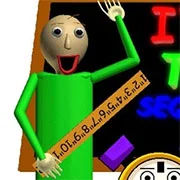
Baldi’s Fun New School Remastered is a fan-made Baldi game with a lot of cool stuff and a lot of new game mode to keep you entertained.
Game Modes:
Exploration Mode: Explore Around Without Baldi Chasing You!
Story Mode: Get All 7 Notebooks And Escape To Win!
Endless Mode: Try Collecting As Many Notebooks As Possible Before Baldi Gets You!
Timed Mode: Collect All The Notebooks And Escape In A Limited Amount Of Time!
Upside Down Mode: Get All The Notebooks And Escape While Everything’s Upside Down!
Camping Mode: Keep The Fires Going While Camping With Baldi And Joe!
Bossfight Mode: The Spinner Boss Has Returned For Round 2! Try And Defeat Him!
Portal Chaos: Collect All 7 Notebooks And Leave The School While Portals Randomly Appear!
Random Event Madness: Random Events Happen More Frequently!
Discussion Area: Chat And Have Discussions With Other Players Online!
Student Race: Race An AI Controlled Student In Collecting All Of The Notebooks And Then Bringing Them Back To Baldi!
And Classic Mode: Play In The Baldi’s Basics Classic Schoolhouse With Features From BFNS Remastered!
Credits
Follow these people for more updates and new games.
Mod Created By JohnsterSpaceGames (AKA JohnsterSpaceProgram)
Clocker Character Created By SirOofy90
Platforms Unity Asset Used For Mobile Input Created By SWA Team
Baldi’s Basics Created By Basically Games
Some Music Created By ConnorPizzaOnWheels
Joe Design Created By michaeldoesgaming
Game Jolt Support Added With Help From YuraSuper2048
Download
It is recommended that you download the game for your PC, Linux, Android here
How to Play:
How to Play:
W, A, S, D – Move Around
Mouse – Look Around
Shift – Run
Right Click – Interact With Objects
Left Click – Use Items
Escape/P – Pause Game (In All Modes Except Discussion Area And Bossfight)
Q – Quit Level (In Bossfight And Discussion Area Modes)
Tab – Toggle Chat Feed (In Discussion Area Mode)
You might like
See all
PolyPine: Nature Simulator
Educational202680
Operate Now: Scoliosis Surgery
Educational202680

Poly Bridge Free Online
Educational202680
Chess Master 3D
Educational202670

Mario Maker (MIT Scratch)
Educational202670

Bloxorz: Roll the Block
Educational202670

Planetarium 2
Educational202670

Car Drawing Game
Educational202660
Frog Fractions
Educational202660
BiDomi
Educational202660
Keyboard Breaker
Educational202660
Alpha Attack
Educational202660

LODGE: Seaside Escape
Educational202650

Evolution AI Simulation
Educational202650

The World’s Easyest Game
Educational202650

Typewriter Simulator
Educational202650

Static Cling
Educational202650

Scrabble Blast
Educational202650
Waterworks!
Educational202650

Bad Piggies 2018
Educational202650