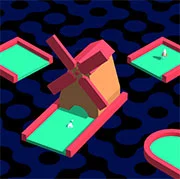
Flippy Golf







Physics
4.5
HTML5|Mouse / Keyboard|Browser
A gold plaformer game where you rotate tiles and get the golf ball into the hole.
Credits:
All graphics, font and SFX sounds used in this game are free to use from Kenney assets library.
Game made for Kenney Jam 2021 (theme – rotation) in Godot Engine.
How to Play:
How to Play:Keyboard: WASD or arrow keys – move, Space – jump (if you picked rocket), R – restart, F – switch fullscreen mode
Gamepad: Left stick – move, bottom action button – jump (if you picked rocket), left action button – restart, top action button – switch fullscreen mode
You might like
See all
Touchdowners
Physics
4.5
Floppy Frog
Physics
4.5

Intergalactic Juice Bar
Physics
4.5

Soccer Physics 2
Physics
4.5

Swipe Skate
Physics
4.5

Red Ball 2
Physics
4.5
Plinko Ball
Physics
4.5
Free rider 3
Physics
4.5
Physics Climber – Ragdoll Physics Game
Physics
4.5

World Soccer Physics
Physics
4.5
Accurate Slapshot Level Pack 2
Physics
4.5

Puppet Soccer Champions-League
Physics
4.5

Rooftop Snipers
Physics
4.5
Lob Master 3
Physics
4.5

Climbing Over It
Physics
4.5

Ragdoll Throw Challenge – Stickman Playground
Physics
4.5

Bakugan: Battle Brawlers
Emulator
4.5

Super Metroid
Emulator
4.5

Game & Watch Gallery 3
Emulator
4.5

Mario & Luigi RPG 3
Emulator
2.5