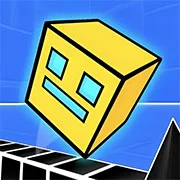
Geometry Dash 3D
Slope Game
Reaction time2026110

Pixel Dodge
Reaction time202680

Traffic Run
Reaction time202680

We Are In A Simulation Simulator
Reaction time202670

Minecraft Endless Runner
Reaction time202670

Geometry Dash Remastered
Reaction time202660
Stop Platformer
Reaction time202660

Angry Gran Run Japan
Reaction time202660

Wild Race
Reaction time202650

Monster VS Bird
Reaction time202650
Trigonometry Dash
Reaction time202650

Death Run 3D
Reaction time202650
HTML5|Mouse / Keyboard|Browser
Geometry Dash 3D takes the classic platformer into a whole new dimension. This rhythm-based speed game challenges players with a fresh 3D perspective while keeping the same intense difficulty fans love. Instead of just moving left to right, you’ll now navigate obstacles from multiple angles—requiring sharper reflexes and better timing than ever.
Players control a cube that automatically moves forward through twisting levels filled with spikes, gaps, and deadly traps. With portals that flip gravity, rings that launch you higher, and shape-shifting mechanics, every level keeps you on edge. The game keeps the iconic style of Geometry Dash but adds depth—literally. Secret coins are hidden in clever spots, and the soundtrack features remixed versions of fan-favorite tracks.
If you’re looking for a fast-paced challenge, try Geometry Dash 3D—available now on KBHGames for instant play. Just remember: one wrong move means starting over, so stay sharp.
You might like
See all
HACOPALACE
Reaction time202650

Dino Rex
Reaction time202650

Mega Jump
Reaction time202650
Slope Tunnel
Reaction time202640

Slope 3 Online
Reaction time202640

Slope Multiplayer
Reaction time202640

Jelly Runner
Reaction time202640

Slope Ball
Reaction time202640

Subway Surf
Reaction time202640

Power Pamplona
Reaction time202640

Wheelie Party
Reaction time202640

Geo Slash
Reaction time202640
Roll Rush Extreme
Reaction time202640

Sunday Drive
Reaction time202640
Hover Racer Drive
Reaction time202640
Tik Ball
Reaction time202640
Super Grower
Reaction time202640
Flipping Master
Reaction time202630
Jelly Run 2048
Reaction time202630

Wave Road
Reaction time202630