Ninja vs Zombies 2

Grand Theft Auto: Vice City
Action
3.7

Bleach vs Naruto 3.3
Action
2.5

Terraria
Action
5

Happy Wheels
Action
4.5

RocketGoal.io
Action
5

Stick War 2
Action
4.5

Bloxd.io
Action
5

PolyTrack
Action
4.5

100 Doors Games: Escape from School
Action
4.5

Crazy Cattle 3D
Action
2.5
Sprunki Sandbox: Ragdoll Playground Mode
Action
3.3

Lucky Tower 2
Action
3.3
Action
4.5
HTML5|Mouse / Keyboard|Browser
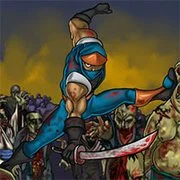
Zombies had overcame Tokyo Japan, as a ninja you must save the world by slashing them down. Upgrade your speed, health, slash, and more so you can defeat even more zombies and complete all the levels. Try to earn all the achievements to prove that you’re a savage.
Ninja vs Zombies 2 is a side-scrolling where you take the role of a skilled ninja! Defeat Zombies, ghouls, and many other undead that had risen from their graves. Slay them with your special skills. You can also learn new special skills that can be activated at the cost of 1 soul. Souls recharge as you fight, so keep spamming the strongest attack and defeat all enemies in one single swoop! Good luck and have fun!
How to Play:
How to Play:WASD – Move
Q / E – Change Weapon
Mouse – Navigate / Aim
Left Mouse Button – Attack / Select / Throw Shuriken
Space – Use special skill
You might like
See all
3 Foot Ninja 2
Action
4.5

Gun Simulator
Action
4.5

Deer Adventure
Action
4.5

Critical Strike: Global Ops
Action
4.5

Granny 2
Action
4.5

BumpyBall.io
Action
4.5

Schoolbreak.io
Action
5

Lurkers.io
Action
5

Venge.io
Action
5

Escape Road City 2
Action
4.5

Dude Theft Auto
Action
5

Madalin Stunt Cars 2
Action
5

Devast.io
Action
4.5

Brutal.io
Action
4.5

Kour.io
Action
5

Deadswitch 3
Action
2.5
Rebuild 2
Action
4.5

Mini Royale: Nations
Action
4.5
Color Rush
Action
5
Buddy Blitz
Action
5