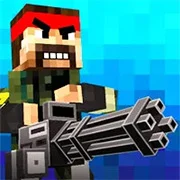
Pixel Warfare

BuildNow GG
Shooting
5

Baby Sniper In Vietnam
Shooting
4.5

Stealth Sniper
Shooting
5

1v1 Battle
Shooting
5
1943: The Battle of Midway (Arcade)
Shooting
4.5

10 Minutes Till Dawn
Shooting
4.5

1941: Counter Attack
Shooting
4.5

19XX: The War Against Destiny
Shooting
4.5

1941 Frozen Front Online
Shooting
4.5

13 Days After: Survival
Shooting
4.5

War Heroes: France 1944
Shooting
5

A Sniper’s Vengeance : The Story of Linh
Shooting
4.5
Shooting
4.5
HTML5|Mouse / Keyboard|Browser
Pixel Warfare is a really cool multiplayer game in Minecraft style. You can choose from lots of different weapons like a shotgun, sniper, rocket launcher, and more! There are also lots of different maps to play on, so you can find the perfect one for you!
The game is really easy to start playing! You just have to choose a game in the menu and you’re ready to go! You can also create your own game room if you want to have full control over the game. Here you can choose the game mode, map, round duration, max players, weapons to allow, and more!
Pixel Warfare will remember how well you’re doing and show you your stats in the menu screen. This way, you can see how much you’ve improved over time!
How to Play:
How to Play:
Use the WASD or arrow keys to move around
R to reload
1-6 number keys to select your weapon
Press the tab to go to the menu
You might like
See all
2DOOM
Shooting
4.5

Hazmob FPS: Online Shooter
Shooting
5

13 Days in Hell
Shooting
4.5

A Gun in Time
Shooting
4.5

Madness Project Nexus
Shooting
5

Binding of Isaac
Shooting
4.5

SkillWarz: Legacy Edition
Shooting
4.5

A Zombie Survival game
Shooting
4.5

Robokill
Shooting
4.5

Resident Evil: Director’s Cut
Shooting
4.5

Gun Mayhem 3
Shooting
4.5
Dead Zed 2
Shooting
4.5

Heli Attack 3
Shooting
4.5

Endless War 3
Shooting
4.5

Cuphead Brothers in Arms
Shooting
4.5

Cross Fire: Call of Duty
Shooting
4.5

Endless Zombie Rampage 2
Shooting
4.5
SuperHOT
Shooting
4.5

Cannon Defense
Shooting
5
SuperFighters 2
Shooting
4.5