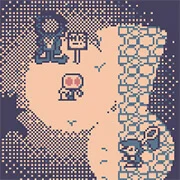
PUK

Your Turn To Die
Adventure
3.8

Undertale Enchanted (HD Remake)
Adventure
4.5

A Long Way Home
Adventure
4.5

10-103
Adventure
4.5

21 Rooms
Adventure
4.5

Endacopia
Adventure
4.5

Brink of Alienation 3
Adventure
4.5

Orion Sandbox 2 Enhanced
Adventure
5

3 Pandas in Brazil
Adventure
4.5

Minecraft Classic
Adventure
3.3

Chibi Knight
Adventure
5

A Night In Crazytown
Adventure
4.5
Adventure
4.5
HTML5|Mouse / Keyboard|Browser
In this slice-of-life, cryptid sim; you are Puk, a pukwudgie of Wampanoag folklore. Explore an open world, gain lots of cryptozoological abilities, and complete a myriad of tasks for cryptids and spooks alike. Featuring multiple endings! With appearances from The Chupacabra, Sasquatch, Mothman and more favorites. Will you complete Puk’s busy day?
Credits:
@bokoyoss
How to Play:
How to Play:
Arrow keys: move Puk / menus
Z: Use ability in Z slot / advance dialogue / assign Z slot
X: Use ability in X slot / assign X slot
Enter: Open / Close ability menu
Tab: Open / Close task menu
You might like
See all
A Duck Has An Adventure
Adventure
4.5

A Goody Life
Adventure
4.5

A pixel Adventure
Adventure
4.5

A Tale of Colours
Adventure
4.5

Jelly Mario Bros
Adventure
4.5

Rob Brainrot 2
Adventure
5

Her Trees
Adventure
4.5

Breaking into the Bank with Henry Stickmin
Adventure
4.5

Riddle School: Re-Riddled
Adventure
4.5

Garfield’s Scary Scavenger Hunt 2
Adventure
4.5

Jumping Finn
Adventure
4.5

Last Day on Earth Survival
Adventure
4.5

Astrocreep
Adventure
4.5

Cowboy Safari
Adventure
5
Orion Sandbox
Adventure
4.5
Ruins of the Titan
Adventure
4.5
Hungry Lamu
Adventure
4.5

Ice Scream: Horror Escape
Adventure
4.5

Spongebob Questpants 3
Adventure
4.5

Void Fish
Adventure
4.5