Swords & Souls

Rpg
4.5
HTML5|Mouse / Keyboard|Browser
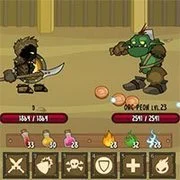
Welcome to Swords & Souls, an action-packed journey of heroism where your destiny awaits! Begin by customizing your hero’s appearance and giving them a name before delving into intense training for battle. Engage in thrilling arena fights against other formidable heroes, earning valuable currency to upgrade your skills and weapons.
As you progress on this heroic journey, seize the opportunity to enhance your hero’s strength, defense, accuracy, and agility through a variety of engaging mini-games. Level up to unlock new abilities and powerful moves that will set you apart in the arena. While battles involve automatic attacks, you have control over special and defensive skills, adding strategic depth to the combat.
Will you rise as a legendary hero, conquering formidable magical creatures and proving your mettle in epic challenges? Swords & Souls invites you to forge your path to greatness, where every battle brings you closer to becoming the hero you were destined to be. Prepare for action, upgrade your skills, and embark on an unforgettable adventure in Swords & Souls!
Swords & Souls is flash game made by Soul Studio in 2015. Now it is playable again online.
How to Play:
How to Play:Mouse for most interactions (explained in-game)
Training:
Arrows/WASD and Mouse
Battles:
1-6 = Use Skills
1-6 + Shift = Use Potions and Spells
You might like
See all
Monster Arena
Rpg202640

Duck Life Adventure
Rpg202640
DELTARUNE: A Different Snowgrave
Rpg202640

Danger Dungeon
Rpg202640
Realm of the Mad God
Rpg202640
Castaway
Rpg202640
Cardinal Quest
Rpg202640
Mardek RPG: Chapter 1
Rpg202640

Hex Empire
Rpg202640
Undergarf – Bad Monday Simulator
Rpg202630
Monster Frontier
Rpg202630
ENA: Decimation Journey
Rpg202630
Card Hunter
Rpg202630
Goodgame Empire
Rpg202630
Night At The Colosseum
Rpg202630
Idle Sword 2
Rpg202630
Sports Heads Cards: Soccer Squad Swap
Rpg202630
Rogue Fable 3
Rpg202630
StrikeForce Kitty League
Rpg202630
Last Castle
Rpg202630