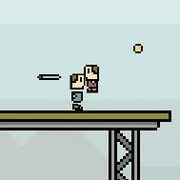
The Platform
18 Wheeler Lumber Cargo
Skill2026260
5 Nights Mega Parking
Skill2026190

Air Traffic Chief
Skill2026140

Alien Thief
Skill2026140
Motocross Trials
Skill2026130
Parking Mania
Skill2026110
Park My Plane
Skill202690

Parking Perfection 2
Skill202680

Happy Builder
Skill202670

Angry Bird Cannon 2
Skill202650

Boom Boom Bloon
Skill202650
Firefighters Truck 2
Skill202650
Skill
4.5
HTML5|Mouse / Keyboard|Browser
Use your skill and reflexes to dodge obstacles and remain on the Platform as long as you can. Run, jump, duck and use Slow Motion to avoid hazards.
Collects coins to buy upgrades that will allow you to stay on the platform longer. You may take two upgrades into each game, try different combinations to find your favorite!
Play a friend or a computer in ‘Versus Mode’. Either compete for a better score or simply try to out live your opponent. In ‘Versus Mode’ collect coins to replenish your timebar.
How to Play:
How to Play:Left/Right/A/D – Run
Up/W – Jump
Down/S – Duck
Space/F – Slow Time
Press P to pause and quit the current game.
You might like
See all
Give Up Robot 2
Skill202640
Taxi Apocalypse
Skill202640

Soccer Star Head Ball
Skill202640
Short Ride
Skill202640
The Final Slice: TMNT
Skill202640
Busman Parking 2 HD
Skill202640

Insurgo
Skill202630
Scary Maze
Skill202630
Tomb Temple Run
Skill202630
Mobs, Inc.
Skill202630
The Immortal Life of the Son of Jay
Skill202630

Monsters Den Book of Dread
Skill202630
Semi Driver
Skill202630
Minecraft Parking
Skill202630
Swing Soccer
Skill202630
Blind Blade
Skill202630
SuperHero BMX Space Rider
Skill202620
Spikes Tend to Kill You
Skill202620

Castle Clout
Skill202620

Dark Maze
Skill202620