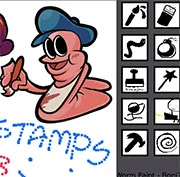
Worm Paint
My Lil Bastard
Funny20261324
Charlie The Steak 3D Online
Funny2026811
Sketchy Individuals
Funny2026490

Hobo 7: Heaven
Funny2026401
A Date with Death 2
Funny2026340
5 AM at Freddy’s: The Prequel
Funny2026310

5 Minutes to Kill Yourself Reloaded
Funny2026250
5 Minutes to Kill Yourself Airport Edition
Funny2026220
Hobo 6: HELL
Funny2026200
A Date with Death
Funny2026190

Water Ragdoll 2
Funny2026170
Sadmin Night – Anomalous Stickmin Survival
Funny2026160
Funny
4.5
HTML5|Mouse / Keyboard|Browser
Worm Paint is a super fun graphics editor that lets you dive into a world of creativity with a twist—everything is worm-themed! Created by TristoneThePerson, with catchy music by CollateralDamageJr, this unique tool lets you experiment with all sorts of funky and wacky art tools to make your digital masterpieces.
Whether you’re a seasoned artist or just starting out, “Worm Paint” invites you to try something different and exciting. But there’s one rule you’ve got to remember: never hit the “F” key while playing! It adds a little bit of mystery and fun as you explore all the creative possibilities.
Get ready to unleash your imagination in the most unusual way with “Worm Paint” and see where your art can take you!
You might like
See all
School Flirting Game
Funny2026140
Murder the King
Funny2026140

Angry Gran Run Brazil
Funny2026140
Doodieman Voodoo
Funny2026130

When Goats Join Cults
Funny2026130
DEEEER Simulator
Funny2026100

Whack Your Computer
Funny202690
Duck Life: Battle
Funny202690
It’s Just TIC TAC TOE
Funny202680
Toaster Ball
Funny202670
Hobo Brawl
Funny202670
Short Life
Funny202650
Crazy Sonic
Funny202650
T-Rex Game
Funny202650
Cat with Bow Golf
Funny202650
Nyan Cat FLY
Funny202650

Interactive Buddy 2
Funny202650

Cat Simulator: Kitty Craft
Funny202650
Dunkers
Funny202640

Yu-Gi-No
Funny202640