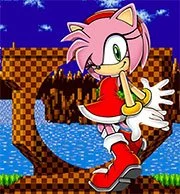
Amy Rose in Sonic 1

Geometry Dash Lite
Html520263634

Sonic the Hedgehog 3
Html520262221

Sonic 3 Prototype
Html52026851

Kiwi Clicker
Html520267193

2v2.io
Html52026701

Incredibox Yellow Colorbox
Html520266816

ParaSprunki 15 – Sprunki Parasite
Html52026582

Mortal Kombat CX: Streets of Rage 2
Html52026550

Sonic 3 Complete – Emerald Safari
Html52026550

Terra – A Terraria Demake
Html52026532

Fix-It Felix Jr.
Html52026460

Sonic CD
Html52026450
Html5
4.5
HTML5|Mouse / Keyboard|Browser
This is a hack that makes Amy Rose the primary character in the original Sonic the Hedgehog for Genesis. It is classic Amy designed after her Sonic CD appearance.
Amy’s moves are inspired by those used in her Sonic Advance appearance. She is slower than Sonic, can’t use spin attack but has other moves. An attack button has been added and other moves can also be performed by using combinations of buttons and directional pad presses.
Moves: See corresponding button-to-keyboard mapping.
Hammer Attack: Press A and Amy swings her hammer, damaging enemies. In addition, Amy can use her hammer to smash obstacles such as walls and hit springs.
Hammer Jump: Press Down + A on the ground and Amy smashes the hammer into the ground, launching her into the air.
Hammer Whirl: Press Down + A in the air and Amy swirls down toward the ground. If an enemy is hit Amy will bounce up again.
Giant Steps: Press Down + B/C while on the ground and Amy will take a giant step forward as opposed to a spin dash. This can be repeated so long as there is room. This move is good for getting up steep slopes; she can even get up slopes the others can’t spin dash up!
Upward Dash: Hold Up + B/C to charge like with super peel out.
Credits: E-122-Psi
Additional programming and coding by:
MarkeyJester, Aquaslash, Selbi, and many others
You might like
See all
Sonic 1 KawariNo
Html52026450

Sonic 1 – Emerald Safari
Html52026430

Granny Original
Html52026382

Billiards Master
Html52026350

Need for Speed: Most Wanted
Html52026320

10×10
Html52026300

Azure Colorbox
Html52026300

Mario Adventure 3
Html52026290

1942 Game (NES)
Html52026290

Kirby Nightmare in Dream Land
Html52026280

Sonic The Hedgehog 2
Html52026281

1212!
Html52026280

100 Meter Race
Html52026270

2048 Solitaire
Html52026260

3 Pandas 2: Night
Html52026250

3D Acrylic Nail: Nail Art Game
Html52026250

60 Minutes Til Rot
Html52026240

7 Words
Html52026240

FNF Character Test Playground
Html52026240

3 Ninjas Kick Back (SNES)
Html52026230