Cards with Personalities

Geometry Dash Lite
Html520263624

Sonic the Hedgehog 3
Html520262221

Sonic 3 Prototype
Html52026851

Kiwi Clicker
Html520267193

2v2.io
Html52026701

Incredibox Yellow Colorbox
Html520266816

ParaSprunki 15 – Sprunki Parasite
Html52026582

Mortal Kombat CX: Streets of Rage 2
Html52026550

Sonic 3 Complete – Emerald Safari
Html52026530

Terra – A Terraria Demake
Html52026532

Fix-It Felix Jr.
Html52026460

Sonic CD
Html52026450
Html5
4.5
HTML5|Mouse / Keyboard|Browser
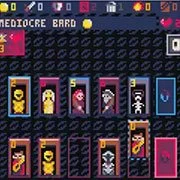
A singleplayer deckbuilding game that is full of charm.
In Cards with Personalities, players take on the role of a humble hero trying to assemble a team of great personalities to defeat the weird bosses that roam the lands. Each turn, you will play cards from your hand to gain Gold, Attack or other effects (like converting monsters to your side). You can spend Gold to acquire new cards from your deck. The attack is used to slay monsters, which earns you Gold and other cool effects. The battlefield is always changing so you have to adapt and come up with new strategies to defeat all eight bosses!
Rules
Every turn starts by you drawing five cards from your deck. Your deck always starts with the same ten cards, seven mediocre bards and the three common guards. In order to win you will need to buy and defeat cards in the middle lane to build a better deck. To do that, first draw from your deck by pressing the action button, then select which card you want to play and again presss the action button. After that, select the monster or minion you want to slay/buy. If you want to read more about the cards, press the secondary button on them at any time.
Cards
There are three types of cards:
Minions
Cost Gold to buy and are indicated by the color of light blue (or brown for common cards). When bought, they are put in the graveyard and will be shuffled in the deck when there are no cards left to draw from your deck. The effects of the minions are activated when they are played.
Monsters
Cost Attack to slay and are indicated by the color of dark purple. Monsters in the lane attack every turn for one damage so keep that in mind. The effects are played out when slaying them. After doing its effects the monster is removed from play.
Bosses
Each boss has different effects. They will only attack when their criteria are met. The criteria are always depending on how many turns a player has taken. When the number of turns corresponds to the criteria, the boss will attack and the turns will reset to zero. Bosses will also boost up their attack, they also follow a similar pattern to the criteria, but the number of turns does not have to be equal.
One really important thing to keep in mind is to remember to attack the boss, this will attack the boss with your remaining Attack so if you plan to slay monsters do that first.
End turn
If you have no cards left to play and you have done everything you planned this turn, press the action button on your deck and the turn will end. Three things will always be checked. First all your resources will reset (excluding block that will reset last). Then if monsters exist in the lane they will attack. And lastly, if the criteria of the boss are met, it too will attack. Then five new cards can be drawn again and a new turn starts.
Game end
Each game will have you trying to reduce the current boss’s health to zero. If you manage that you will be rewarded with lots of XP to unlock more bosses and backgrounds. If the boss manages to reduce your health to zero the game ends as well, only rewarding you XP for how much health you managed to reduce from the boss.
Credits
Design, programing and art
Sebastian Lind
Twitter: @Elastiskalinjen
Music and SFX:
José Ramón “Bibiki” García (check him out, he is awesome!)
Twitter: @BibikiGL
Website: http://bibikigarcia.com
Main tester:
Simon Lind (My always helpful brother and biggest fan)
Twitter: @YTFFTW
How to Play:
How to Play:
Move cursor
Keyboard: Arrow keys | Controller: D-pad or Joystick
Action button
Keyboard: Z | Controller: A / Y
Secondary button
Keyboard: X | Controller: B / X
You might like
See all
Sonic 1 KawariNo
Html52026450

Sonic 1 – Emerald Safari
Html52026430

Granny Original
Html52026382

Billiards Master
Html52026350

Need for Speed: Most Wanted
Html52026320

10×10
Html52026300

Azure Colorbox
Html52026300

Mario Adventure 3
Html52026290

1942 Game (NES)
Html52026290

Kirby Nightmare in Dream Land
Html52026280

Sonic The Hedgehog 2
Html52026281

1212!
Html52026280

100 Meter Race
Html52026270

2048 Solitaire
Html52026260

3 Pandas 2: Night
Html52026250

3D Acrylic Nail: Nail Art Game
Html52026250

60 Minutes Til Rot
Html52026240

7 Words
Html52026240

FNF Character Test Playground
Html52026240

3 Ninjas Kick Back (SNES)
Html52026230