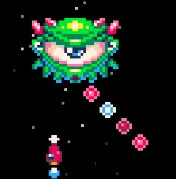
Cherry Bomb

Geometry Dash Lite
Html520263714

Sonic the Hedgehog 3
Html520262241

ParaSprunki 15 – Sprunki Parasite
Html52026863

Sonic 3 Prototype
Html52026861

Kiwi Clicker
Html520267493

2v2.io
Html52026721

Incredibox Yellow Colorbox
Html520267016

Terra – A Terraria Demake
Html52026612

Mortal Kombat CX: Streets of Rage 2
Html52026580

Sonic 3 Complete – Emerald Safari
Html52026560

Fix-It Felix Jr.
Html52026490

Sonic 1 KawariNo
Html52026470
Html5
4.5
HTML5|Mouse / Keyboard|Browser
Cherry Bomb is a arcade shoot’em up arcade game inspired by classic games like Space Invaders or Galaga.
Will you be able to complete all 9 levels?
Learn How to Make This Game!
Cherry Bomb was created as part of a tutorial series about how to make your own game from scratch. If you also want to make a game like this check out the Lazy Devs Academy YouTube Channel!
Credits
This game was written and designed by Krystian Majewski, an Independent Developer and the host of the Lazy Devs Academy video channel.
The music was composed by Sebastian Haßler, a music composer for film, TV and videogames.
Cherry Bomb game was written entirely in Pico-8.
How to Play:
How to Play:
Arrow keys – Move the ship
X or M or V – Shoot
Z or N or C – Bomb (Depletes your 🍒. See below)
You can also use a controller
You might like
See all
Sonic 1 – Emerald Safari
Html52026460

Sonic CD
Html52026460

Granny Original
Html52026402

Billiards Master
Html52026380

Need for Speed: Most Wanted
Html52026340

Sonic The Hedgehog 2
Html52026321

Mario Adventure 3
Html52026320

Azure Colorbox
Html52026320

10×10
Html52026310

Kirby Nightmare in Dream Land
Html52026310

1942 Game (NES)
Html52026300

1212!
Html52026290

100 Meter Race
Html52026280

3D Acrylic Nail: Nail Art Game
Html52026280

2048 Solitaire
Html52026260

3 Pandas 2: Night
Html52026260

60 Minutes Til Rot
Html52026250

FNF Character Test Playground
Html52026250

7 Words
Html52026240
Grand Theft Auto
Html52026230