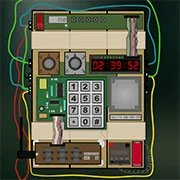
Defuse The Bomb!

Geometry Dash Lite
Html520263624

Sonic the Hedgehog 3
Html520262221

Sonic 3 Prototype
Html52026851

Kiwi Clicker
Html520267193

2v2.io
Html52026701

Incredibox Yellow Colorbox
Html520266816

ParaSprunki 15 – Sprunki Parasite
Html52026582

Mortal Kombat CX: Streets of Rage 2
Html52026550

Sonic 3 Complete – Emerald Safari
Html52026530

Terra – A Terraria Demake
Html52026532

Fix-It Felix Jr.
Html52026460

Sonic CD
Html52026450
Html5
4.5
HTML5|Mouse / Keyboard|Browser
Learn to defuse an online virtual bomb in this fun simulation puzzler.
The clock is ticking the bomb is about to explode unless you disarm it.
Before you start, read the manual to learn how all the circuits and connections work.
Cut the wrong cable and it might be your last day at work.
Start out as newbie level, learn the basics, and move all the way up to professional level.
For a better experience, it is recommended playing the game with a friend, as you work together to defuse the bomb. Player 1 defuse the bomb, while player 2 is giving him instructions from the manual. Player 1 can’t blook into the manual, and player 2 can’t look at the bomb that is being defused.
You can practice and follow every step to learn how it goes, then you can choose a difficulty level and pray everything goes well.
Download the manual here.
You might like
See all
Sonic 1 KawariNo
Html52026450

Sonic 1 – Emerald Safari
Html52026430

Granny Original
Html52026382

Billiards Master
Html52026350

Need for Speed: Most Wanted
Html52026320

10×10
Html52026300

Azure Colorbox
Html52026300

Mario Adventure 3
Html52026290

1942 Game (NES)
Html52026290

Kirby Nightmare in Dream Land
Html52026280

Sonic The Hedgehog 2
Html52026281

1212!
Html52026280

100 Meter Race
Html52026270

2048 Solitaire
Html52026260

3 Pandas 2: Night
Html52026250

3D Acrylic Nail: Nail Art Game
Html52026250

60 Minutes Til Rot
Html52026240

7 Words
Html52026240

FNF Character Test Playground
Html52026240

3 Ninjas Kick Back (SNES)
Html52026230