
Dreaming Knight: The Little Hero

Rpg
4.5
HTML5|Mouse / Keyboard|Browser
Dreaming Knight: The Little Hero
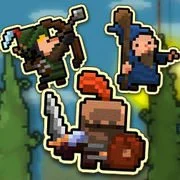
An RPG/Bullet Hell/Brawler mashup from indie developer team Spotcos!
Based off a Ludum Dare project made in 72 hours.
Smash hordes of monsters, dodge endless waves of bullets, collect gold and upgrade your gear on your quest to defeat the three evil bosses (bullies) and save the princess (hot teacher).
In this dream world, YOU are the hero!
How to Play:
How to Play:–Controls–
WASD – Move
Left Click – Swing Sword
Right Click/Space – Shoot Arrow
F1 – Fullscreen (recommended!)
You might like
See all
Cardinal Quest
Rpg202640
Mardek RPG: Chapter 1
Rpg202640

Duck Life Adventure
Rpg202640

DELTARUNE: A Different Snowgrave
Rpg202640

Danger Dungeon
Rpg202640

Hex Empire
Rpg202640
Castaway
Rpg202640
Monster Arena
Rpg202640
Swords & Souls
Rpg202640
Realm of the Mad God
Rpg202640
Undergarf – Bad Monday Simulator
Rpg202630
Card Hunter
Rpg202630
Rogue Fable 3
Rpg202630
Monster Frontier
Rpg202630

Goodgame Empire
Rpg202630
Night At The Colosseum
Rpg202630
ENA: Decimation Journey
Rpg202630
Idle Sword 2
Rpg202630
Sports Heads Cards: Soccer Squad Swap
Rpg202630
Super Adventure Pals
Rpg202630