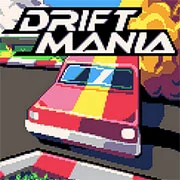
Driftmania

Geometry Dash Lite
Html520263714

Sonic the Hedgehog 3
Html520262241

ParaSprunki 15 – Sprunki Parasite
Html52026863

Sonic 3 Prototype
Html52026861

Kiwi Clicker
Html520267493

2v2.io
Html52026721

Incredibox Yellow Colorbox
Html520267016

Terra – A Terraria Demake
Html52026612

Mortal Kombat CX: Streets of Rage 2
Html52026580

Sonic 3 Complete – Emerald Safari
Html52026560

Fix-It Felix Jr.
Html52026490

Sonic 1 KawariNo
Html52026470
Html5
4.5
HTML5|Mouse / Keyboard|Browser
“Driftmania” offers an adrenaline-fueled arcade experience, challenging players to master the art of drifting as they race against the clock on 15 thrilling tracks. In this fast-paced time trial racing game, your objective is simple: achieve the fastest possible time on each track by expertly executing drifts and maintaining control of your vehicle.
As you navigate through each track, you’ll encounter a variety of challenging obstacles and tight corners that will put your drifting skills to the test. With precise timing and expert maneuvering, you’ll need to slide your way around corners while maintaining maximum speed to shave precious seconds off your lap times.
“Driftmania” features responsive controls and dynamic physics that allow players to perform a variety of drifts and maneuvers with precision and finesse. Whether you prefer to drift around tight hairpin turns or power-slide through sweeping curves, the game offers a satisfying level of control and realism that will keep you coming back for more.
Tips
You turn faster when holding the D-Brake
Take a good look at the minimap before starting a track. You need to anticipate the turns to get the best times
Grass does not slow you down. It reduces traction, which you can use to your advantage for drifting!
Driving over yellow tiles will activate boost. Boost works with whatever direction you’re facing – it doesn’t matter where the arrow on the ground is pointing
Garage customizations do not change car handling. Make your car look however you want it to!
An optional ghost can be enabled in the pause menu. Replays are lost when exiting a track
Credits
Created by Max Bize
Music by Vav
Cars (based on) art by PixelArtM
Cover art by TerracotaScarf
I’m running a $150 speedrun tournament now until March 3rd. Want to compete? Join the Discord
You can follow more of my game development on Twitter
How to Play:
How to Play:Controls (Racing)
Up Arrow or Z: Accelerate
Down Arrow: Brake + Reverse
Left Arrow: Turn left
Right Arrow: Turn right
X: D-Brake
R: Restart level
P: Pause game + Options menu
Controls (Menu)
Arrow keys: navigate selection
Z or X: Select
You might like
See all
Sonic 1 – Emerald Safari
Html52026460

Sonic CD
Html52026460

Granny Original
Html52026402

Billiards Master
Html52026380

Need for Speed: Most Wanted
Html52026340

Sonic The Hedgehog 2
Html52026321

Mario Adventure 3
Html52026320

Azure Colorbox
Html52026320

10×10
Html52026310

Kirby Nightmare in Dream Land
Html52026310

1942 Game (NES)
Html52026300

1212!
Html52026290

100 Meter Race
Html52026280

3D Acrylic Nail: Nail Art Game
Html52026280

2048 Solitaire
Html52026260

3 Pandas 2: Night
Html52026260

60 Minutes Til Rot
Html52026250

FNF Character Test Playground
Html52026250

7 Words
Html52026240
Grand Theft Auto
Html52026230