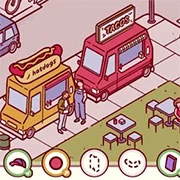
Nippets

BFDIA: 5b – Battle for Dream Island
Puzzle
4.5

A Taste of the Past
Puzzle
4.5
A Little to the Left
Puzzle
4.5
Crimson Room
Puzzle
4.5
Deepest Sword
Puzzle
4.5
A Game of Cups
Puzzle
4.5

Angry Birds Halloween HD
Puzzle
4.5
Admin
Puzzle
4.5
Puzzle Pelago
Puzzle
4.5
Zombie Sports Golf
Puzzle
4.5
Night Light
Puzzle
4.5
Big-Time Butter Baron
Puzzle
4.5
Puzzle
4.5
HTML5|Mouse / Keyboard|Browser
Nippets is a fun hidden object game where you explore a cool city that looks like it was drawn by hand. Your job is to find different things hidden all over the place and give them back to their owners. You’ll need to tap on windows, open blinds, and even shake trees to discover all the hidden items.
Right now, there’s one city area you can check out, with over 20 items to find. The game also has awesome music that goes with it. You can play it using a mouse and keyboard.
We’re making more maps and we’d love to know what you think of the game!
Made by Vatnisse Interactive:
Frederikke Frydenlund, Lee Kemp and Alex Nicholson
How to Play:
How to Play:
F / F11 – Fullscreen (recommended!)
LMB – Press / Press and hold to click and drag things in the world.
RMB – Press and drag to navigate the scene.
Refresh the browser window to restart the game.
You might like
See all
The Saddest Zombie
Puzzle
4.5
Hyper Maze Arcade
Puzzle
4.5

Truck Loader
Puzzle
4.5
Zombie Parade Defense 3
Puzzle
4.5
Replaceable Blocks
Puzzle
4.5
An Oddly Satisfying Game
Puzzle
4.5
The Scruffs Online
Puzzle
4.5
Submachine 10: the Exit
Puzzle
4.5
Block Puzzle
Puzzle
4.5
World’s Hardest Game
Puzzle
4.5
Roly-Poly Cannon: Bloody Monsters Pack 2
Puzzle
4.5
Train Crisis Lite
Puzzle
4.5
Robo Trobo
Puzzle
4.5
Tomb Run (Tomb of the Mask)
Puzzle
4.5
Youda Legend The Golden Bird of Paradise
Puzzle
4.5

Confuse Box 2
Puzzle
4.5

Alien Catcher
Puzzle
4.5
Grow Cube
Puzzle
4.5

ROme Puzzle
Puzzle
4.5

Baba Yaga Room Escape Game
Puzzle
4.5