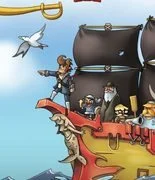
Pirateers 2

Buckshot Roulette
Strategy
4.5

Stick War
Strategy
3.8
Battle Panic
Strategy
4.5

Plants vs Zombies 2 on MIT Scratch
Strategy
4.5

Save The Pets
Strategy
4.5

1066 War
Strategy
4.5

Madness Retaliation
Strategy
5

A Lone Manor
Strategy
4.5

Dear Edmund
Strategy
4.5
3 Kings
Strategy
4.5

PvZ (Plants vs Zombies) on MIT Scratch
Strategy
2.5
Necronator 2
Strategy
4.5
Strategy
4.5
HTML5|Mouse / Keyboard|Browser
Become a pirate captain, get your comrades and set sail to being your journey to hunt for the legendary treasure. Do what pirates do, rob merchants and battle royal navy, sea monster, and of course other pirates. Customize and upgrade your ship to be faster, stronger and fiercer. Loot and plunder your way to fame and fortune and become the most wanted pirate.
How to Play:
How to Play:Mouse Control
– Left click to steer ship
– Right click to shoot
(Go to the options menu to swap the left click and right click functions)
Keyboard
– [A,D] or [Left,Right] to turn
– [W,S] or [Up,Down] to adjust speed
– [Space] bar to shoot
– [Tab] key to switch weapons
– [Shift] or [M] to open minimap
– [Z,X,C] to start quest
– [`] to cancel quest
– [1,2,3] to activate crew’s abilities
You can enable/disable tutorial in the options menu.
You might like
See all
Swarm Queen
Strategy
4.5

Steal a Brainrot
Strategy
4.5

Zombie Trailer Park
Strategy
4.5
Left to Die: Final Siege
Strategy
4.5
Colonial Wars
Strategy
4.5

Warfare 1917
Strategy
4.5

Sweatshop
Strategy
4.5
Epic War 4
Strategy
4.5
Mindustry
Strategy
4.5

Garden TD
Strategy
4.5
War Clicks
Strategy
4.5

Retromine
Strategy
4.5

Egg Riot
Strategy
4.5

Death Defense of Metal Slug
Strategy
4.5

Spectromancer Truth and Beauty
Strategy
4.5

Frontline Defense 2
Strategy
4.5
DUO/UNO With Friend Online
Strategy
4.5

Wonder Defender
Strategy
4.5
Raid Mission
Strategy
4.5

Nick Block Party 2
Strategy
4.5