Quento

Geometry Dash Lite
Html520263634

Sonic the Hedgehog 3
Html520262221

Sonic 3 Prototype
Html52026851

Kiwi Clicker
Html520267193

2v2.io
Html52026701

Incredibox Yellow Colorbox
Html520266816

ParaSprunki 15 – Sprunki Parasite
Html52026582

Mortal Kombat CX: Streets of Rage 2
Html52026550

Sonic 3 Complete – Emerald Safari
Html52026550

Terra – A Terraria Demake
Html52026532

Fix-It Felix Jr.
Html52026460

Sonic CD
Html52026450
Html5
4.5
HTML5|Mouse / Keyboard|Browser
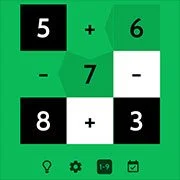
Quento is a delightful little math puzzler without ads that is fun for kids and adults. Over the past 8 years it has been played all over the world by children, parents, students, teachers and basically anyone during commutes, in schools, on camp sites, during lunch breaks, at offices and in bed before going to sleep.
Enjoy endless rounds of quick play, a unique daily challenge, different sets of numbers and a zen mode. And with the special “Quento for Schools” mode, students can play together in class, in smaller groups or engage individual challenges.
How does it work? Simple! Quento gives you the solution to a sum and you’ll have to do the math. To play, just swipe from a number to a + or – and to another number again. Stars are earned when the sum adds up to the challenge above and before you know it you’ve progressed a round!
You might like
See all
Sonic 1 KawariNo
Html52026450

Sonic 1 – Emerald Safari
Html52026430

Granny Original
Html52026382

Billiards Master
Html52026350

Need for Speed: Most Wanted
Html52026320

10×10
Html52026300

Azure Colorbox
Html52026300

Mario Adventure 3
Html52026290

1942 Game (NES)
Html52026290

Kirby Nightmare in Dream Land
Html52026280

Sonic The Hedgehog 2
Html52026281

1212!
Html52026280

100 Meter Race
Html52026270

2048 Solitaire
Html52026260

3 Pandas 2: Night
Html52026250

3D Acrylic Nail: Nail Art Game
Html52026250

60 Minutes Til Rot
Html52026240

7 Words
Html52026240

FNF Character Test Playground
Html52026240

3 Ninjas Kick Back (SNES)
Html52026230