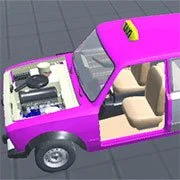
Taz Mechanic Simulator

Minecraft
Simulation
5

Basketball Stars
Simulation
3.8
Terraria Online
Simulation
3.8
Cluster Rush
Simulation
4.5

Airport Madness 4
Simulation
4.5

Paper Minecraft
Simulation
4.5
Snow Rider 3D
Simulation
4.5

Big Shot Boxing
Simulation
4.5

Grow a Garden
Simulation
4.5
AI TPYING ASSISTANT
Simulation
4.5
Sorry Bob
Simulation
4.5

WorldZ Minecraft
Simulation
4.5
Simulation
4.5
HTML5|Mouse / Keyboard|Browser
Taz Mechanic Simulator allow you become your down car mechanic, assemble different part of the car from engines to tired and much more. Once you have finished creating your vehicle, take it around the tracks to see what works and what doesn’t. Make modifications when you have the perfect car. Buy different component such as wheels, bumpers, mirrors, seats and more mechanic stuff like pistons, gearboxes and suspension, to create a whole new car.
How to Play:
How to Play:Mouse = build, Arrows / WASD = drive
You might like
See all
Ultimate Football Manager Season 2015
Simulation
4.5
Xtreme Demolition Arena Derby
Simulation
4.5

Pizza King
Simulation
4.5

Last Play: Ragdoll Sandbox
Simulation
4.5
Rollercoaster Creator Express
Simulation
4.5
Stickman Destruction
Simulation
4.5

Jumpers for Goalposts 3
Simulation
4.5
Mine Blocks
Simulation
4.5

Security Simulator
Simulation
4.5

Military Capitalist: Idle Clicker
Simulation
4.5

Basic Biking
Simulation
4.5

DuckLife
Simulation
4.5

Bob AI
Simulation
4.5

Turbo Dismounting
Simulation
4.5

Flight Simulator Online
Simulation
4.5

Bonsai Tree Builder
Simulation
4.5
Don’t Drink & Drive Simulator
Simulation
4.5
Next Drive
Simulation
4.5
Swarm Simulator: Evolution
Simulation
4.5
Real Challenge Car Stunt
Simulation
4.5