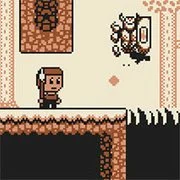
Tower of The Wizard

The King of Fighters 97
Retro202627738
The King of Fighters 98
Retro2026793

Sonic and Knuckles (Sega)
Retro2026610

The King of Fighters 2002
Retro2026591
2-Bit Explorer
Retro2026470
Knights of the Round (Arcade)
Retro2026240
21st Century Roguelike Pac-Man
Retro2026230
Nip For Speed
Retro2026230

1Quest
Retro2026210

The King of Fighters 2000
Retro2026210

Sonic 3000
Retro2026200
Driver (PS1)
Retro2026160
Retro
4.5
HTML5|Mouse / Keyboard|Browser
Tower of The Wizard is a metroidvania platformer where you must defeat The mad Wizard to save your village. Your kingdom’s army is away in foreign lands, so you as a lone adventurer must enter the Wizard’s tower to end his terror.
Navigate a challenging dungeon, filled with traps and foes. Use the map that you will pick up early on in order to find various equipment, and use them in turn to traverse the myriad obstacles the tower presents to you.
In the tower you will find a spear that will allow you to slay foes and bounce on their heads, a pair of gloves that will allow you to slide down walls and also cling to them and jump from them, and last but not least, a light cloak that will allow you to glide as you fall.
You need to explore a vast, open castle, and use your map and your skills to progress. The game is a love letter to the old platformers, and is very challenging. You will need a lot of patience and practice to progress in the game, but once you finally cross a pesky section by pulling off a series of connected maneuvers, you will feel like the biggest badass of them all!
Features:
1) A big tower to explore, consisting of 36 connected rooms.
2) 4 fun character upgrades.
3) 5 different enemy types (not counting the final boss!)
4) 4 different trap types.
5) Challenging and rewarding platform gameplay, interwoven with basic combat mechanics.
6) An intense and surprising boss fight at the end.
7) Retro graphics, inspired by the 4-color palette, and the pixel height (144px) of the gameboy.
8) Chiptune soundtrack.
How to Play:
How to Play:1) Arrow keys to move and jump.
2) I for inventory.
3) Enter to advance text.
You might like
See all
Cadillacs and Dinosaurs Flash
Retro2026140
Sonic 1 Mixed Beta
Retro2026140

SNK vs. Capcom: SVC Chaos Super Plus
Retro2026140

The Grape Escape
Retro2026130
Final Fight (Arcade)
Retro2026120

Leaf Me Alone Expanded
Retro2026120
Bionic Chainsaw Pogo Gorilla
Retro2026100

Silent Hills
Retro2026100

Sonic the Hedgehog: Megadriven
Retro2026100
Need for Speed: V-Rally
Retro202690
Lightning Swords / Ken-Go (Arcade)
Retro202690
Double Dragon (Arcade)
Retro202690

The King of Fighters 2001
Retro202680
Must-a-Mine
Retro202680
Godzilla (Arcade)
Retro202680
Battle Circuit
Retro202680
Legends of Necrodungeons
Retro202680
Sonic 1 Blastless
Retro202680
Abobo Big Adventure
Retro202680
Batman (Arcade)
Retro202670