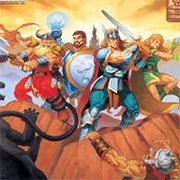
Dungeons & Dragons: Tower of Doom
The King of Fighters 97
Retro20262583
The King of Fighters 98
Retro2026783
Sonic and Knuckles (Sega)
Retro2026590
The King of Fighters 2002
Retro2026541
2-Bit Explorer
Retro2026460
21st Century Roguelike Pac-Man
Retro2026230
Nip For Speed
Retro2026220
The King of Fighters 2000
Retro2026200
1Quest
Retro2026190
Driver (PS1)
Retro2026150
Sonic 1 Mixed Beta
Retro2026140
Cadillacs and Dinosaurs Flash
Retro2026130
Retro
4.5
HTML5|Mouse / Keyboard|Browser
Go on an adventure in Dungeons & Dragons: Tower of Doom a retro side scrolling beat ’em up based on the Dungeons & Dragons tabletop role-playing game and set in the Mystara campaign setting.
Start your adventure by choosing one of four different characters: cleric, dwarf, elf, fighter. Fight with iconic Bosses from the Dungeons & Dragons monsters board game. Include a troll that regenerates unless burned, a large black dragon, the dreaded Shadow Elf (Mystara’s equivalent of the drow), a beholder, the optional superboss Flamewing (a great wyrm red dragon) and the final boss Deimos (an archlich).
Story:
The Republic of Darokin is under a terrible siege as the number of monsters and their attacks rise. A group of four adventurers step forth to rescue various areas, then are sent by the Corwyn Linton to investigate the attacks, revealed to be masterminded by the Archlich Deimos. Eventually the adventurers make their way to the Deimos’ Tower of Doom and ultimately destroy him. (Wikipedia)
Other Dungeons & Dragons include Dungeons & Dragons : Shadow over Mystara
You might like
See all
Sonic 3000
Retro2026130
Knights of the Round (Arcade)
Retro2026130
SNK vs. Capcom: SVC Chaos Super Plus
Retro2026130
Final Fight (Arcade)
Retro2026120

The Grape Escape
Retro2026120

Sonic the Hedgehog: Megadriven
Retro2026100
Leaf Me Alone Expanded
Retro2026100
Battle Circuit
Retro202680
Double Dragon (Arcade)
Retro202680
Silent Hills
Retro202680
Legends of Necrodungeons
Retro202680
Need for Speed: V-Rally
Retro202680
The King of Fighters 2001
Retro202670
Must-a-Mine
Retro202670
Godzilla (Arcade)
Retro202670
Batman (Arcade)
Retro202670
Sonic 1 Blastless
Retro202670
Lightning Swords / Ken-Go (Arcade)
Retro202670
Abobo Big Adventure
Retro202670
Warcraft II: Tides of Darkness
Retro202660