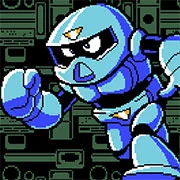
Ganbatte!! Robochan

The King of Fighters 97
Retro202626138

The King of Fighters 98
Retro2026783

Sonic and Knuckles (Sega)
Retro2026590

The King of Fighters 2002
Retro2026541
2-Bit Explorer
Retro2026460
21st Century Roguelike Pac-Man
Retro2026230
Nip For Speed
Retro2026220

The King of Fighters 2000
Retro2026200

1Quest
Retro2026190
Driver (PS1)
Retro2026150
Sonic 1 Mixed Beta
Retro2026140
Knights of the Round (Arcade)
Retro2026140
Retro
4.5
HTML5|Mouse / Keyboard|Browser
In “Ganbatte!! Robochan,” dive into a captivating 2D retro-style action-platformer set in a dystopian future ruled by the sinister General Ironstrike and his army of malevolent robots. As Robochan, the creation of the rebellious scientist Dr. Hikari, you’ll embark on an epic journey to overthrow the tyrannical regime.
Equipped with an array of skills and weapons, you’ll traverse through levels reminiscent of the classic Mega Man series, facing off against challenging bosses and navigating treacherous obstacles along the way. Your mission? To blast through enemy lines, dismantle Ironstrike’s forces, and restore peace to the world.
Prepare for intense action and adrenaline-pumping gameplay as you battle your way through meticulously designed levels filled with traps, enemies, and hidden secrets. With each victory, you’ll inch closer to confronting General Ironstrike and putting an end to his reign of terror once and for all.
With its retro-inspired visuals, engaging gameplay, and thrilling boss battles, “Ganbatte!! Robochan” promises an unforgettable gaming experience that will keep players on the edge of their seats from start to finish. Are you ready to rise up against tyranny and become the hero the world desperately needs?
Use your fire power to defeat the robot soldiers and make your way through stages full of retro pixelated action!
Collect different Power Up items to change your weapon. Try to find out what are the ones that suit you better!
This is a fan-made and is a demo by WLCSoft
How to Play:
How to Play:
A: left
D: right
W: up / climb ladders up
S: down / climb ladders down
J: jump
K: shoot
Press down + jump to drop down from platforms you can jump through.
Press up or down near a ladder to grab it and climb it.
To remap the keyboard, go to Options > Controls
The game is compatible with XInput gamepad.
You might like
See all
Cadillacs and Dinosaurs Flash
Retro2026130

Sonic 3000
Retro2026130

SNK vs. Capcom: SVC Chaos Super Plus
Retro2026130
Final Fight (Arcade)
Retro2026120

The Grape Escape
Retro2026120

Sonic the Hedgehog: Megadriven
Retro2026100
Leaf Me Alone Expanded
Retro2026100

Battle Circuit
Retro202680
Double Dragon (Arcade)
Retro202680

Silent Hills
Retro202680
Legends of Necrodungeons
Retro202680
Need for Speed: V-Rally
Retro202680

The King of Fighters 2001
Retro202670
Must-a-Mine
Retro202670
Godzilla (Arcade)
Retro202670
Batman (Arcade)
Retro202670
Sonic 1 Blastless
Retro202670
Lightning Swords / Ken-Go (Arcade)
Retro202670

Abobo Big Adventure
Retro202670
Warcraft II: Tides of Darkness
Retro202660